Blog

Hàm LEN trong Power BI DAX

ham-len-trong-power-bi-1

Last updated on February 11th, 2022 at 12:17 pm

MIÊU TẢ

Hàm LEN giúp đếm số ký tự của đoạn Text.

CÁCH DÙNG / CẤU TRÚC

Hàm LEN có cấu trúc như sau:

LEN( <Chuỗi ký tự> )

THAM SỐ

Hàm có 1 tham số là <Chuỗi ký tự> : Chuỗi ký tự mà bạn muốn đếm số lượng ký tự. Đó có thể là 1 chuỗi ký tự cụ thể (đặt trong cặp dấu nháy kép) hoặc 1 cột chứa nội dung.

GIÁ TRỊ TRẢ VỀ

Là một số nguyên thể hiện số lượng ký tự có trong đoạn text.

CHÚ Ý

Dấu cách cũng được tính là 1 ký tự.

Nếu dùng hàm LEN để đếm ký tự trong cột chứa dữ liệu không phải ở dạng Text, ví dụ như dạng True/False hoặc dạng Date, hàm sẽ ngầm chuyển đổi giá trị về dạng text và trả về kết quả theo giá trị text đó.

VÍ DỤ

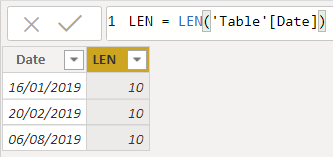
Sử dụng hàm LEN để đếm số ký tự trong cột Date chứa dữ liệu dạng Ngày tháng:ham-len-trong-power-bi-1

= LEN( ‘Table'[Date] )

Nguồn: Internet

    Leave a Reply

    Your email address will not be published. Required fields are marked *

    bujangjp slotsensa slot88 slot4d slot4d slot4d sv388 slot88 suhubet demo slot slot4d demo slot https://fabritec.pe/asesor.php suhubet bujangjp https://kibf.pk/ slotsensa buku303 slot4d sbobet slot gacor slot gacor slot gacor totogacor slot thailand slot thailand slot gacor slot luar negeri slot gacor 4d totogacor slot gacor wd jutaan slotsensa slot gacor slot gacor slotsensa slot gacor slot dana slot dana https://united-mgroup.com/ https://cliffcrestinn.com/ slot resmi demo slot totogacor totogacor demo slot slot 4d totogacor totogacor demo slot totogacor slot thailand totogacor bujangjp situs gacor 4D situs gacor Situs Gacor 4D Thailand Situs Gacor 4D SLOT4D bujangjp